For data centre operations & delivery teams

A new facility.
A team that knows its way around.

Turn your BIM model and handover records into a browser-based environment where technicians can find plant, explore procedure context and locate the information they need.

Before handover. Through early operations. No signup to explore.

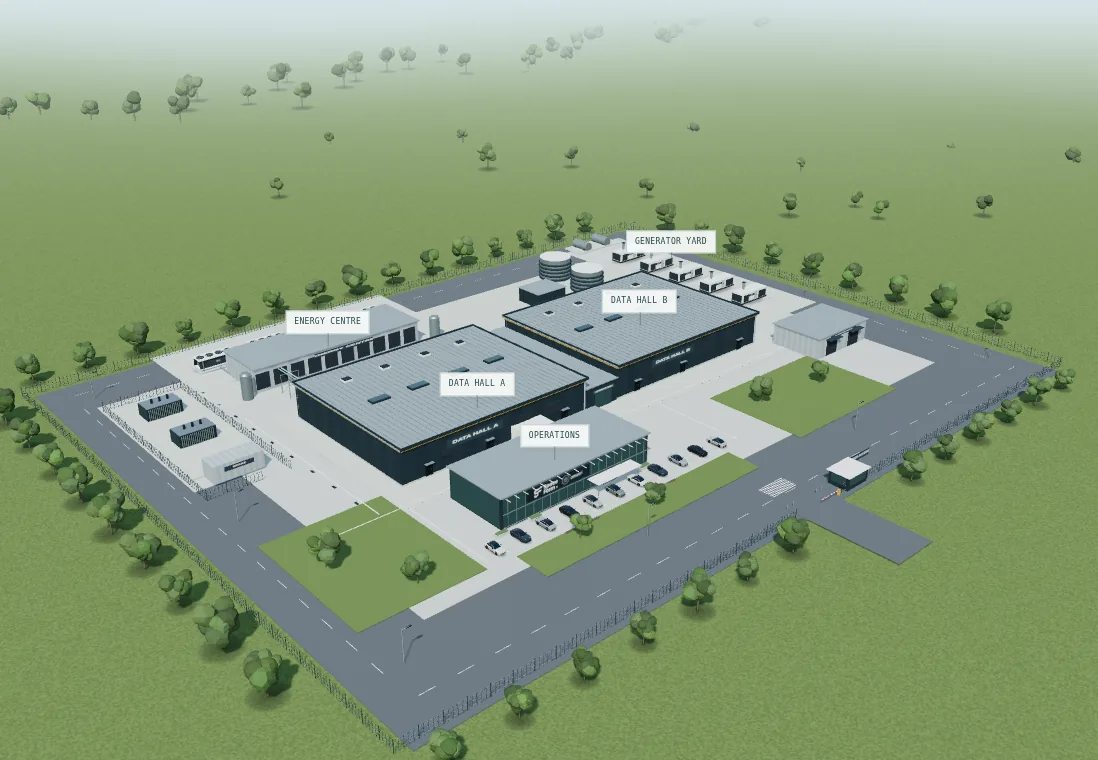
Illustrative campus showing data halls, cooling plant, a generator yard and operations building
YOUR FACILITY, IN CONTEXTIllustrative data-centre model
Fewer repeated site explanations

Make routes and plant locations available before every lesson needs an escorted visit.

Records where they make sense

Connect the selected asset to its O&M, as-built and handover information.

A focused test before you scale

Agree a task, a baseline and the evidence you need to decide whether to continue.

Find the plant. Open the record. See the connection.

Choose a task to jump into the demo, or explore all seven stages. This is an illustrative campus, so you can try it without sharing your site information.

Interactive worked example

Explore the campus in 3D. Follow the route to Hall A, open a cutaway and inspect the sample records.

Start the full tour →
Illustrative geometry and records. No live plant data or operational authorisation. Open the model in a new tab ↗

Handover information exists.
Site knowledge still takes time.

People

Your experienced operators are stretched

New starters need local knowledge while senior staff are commissioning, resolving issues and running the facility.

Our approach: reusable site familiarisation around the plant and routes your team needs to learn.

Procedures

A document leaves the physical context to memory

A procedure is easier to discuss when the team can see the equipment, access constraints and surrounding spaces.

Our approach: link selected procedure steps to model context for rehearsal and discussion.

Records

The right information is spread across the handover

Knowing that a record exists is different from finding the one that applies to this asset and this revision.

Our approach: make approved source records reachable from the plant they describe.

This complements your BIM, CDE, DCIM and BMS. We scope the gap in your current workflow and keep the source of truth and responsibility for approving work explicit.

One site area. One workflow.
A clear decision at the end.

The first conversation is about fit. If a pilot makes sense, we agree the price, scope and evidence before building.

  1. Week 1 · Define the task and baseline

    Select a model area, one real procedure and the relevant handover records. Agree how your team completes the task today.

  2. Week 2 · Build the working example

    Prepare the browser environment and link the selected records to the agreed assets and spaces.

  3. Week 3 · Review with your operators

    Check the content against the agreed sources, correct gaps and run the selected familiarisation task.

  4. Week 4 · Compare and decide

    Review task completion time, correct record retrieval and senior support required. Decide what is worth extending.

What you receive

  • A navigable example for the agreed area and workflow.
  • Selected records connected to relevant assets.
  • A record of source gaps and review decisions.
  • A pilot findings summary against the agreed measures.

What we agree before starting

Usable source data, an operator reviewer, participant time, hosting and access requirements, the fee, and how the environment and records will be maintained or handed over.

The four-week plan starts once those inputs are ready. Complex data preparation or deployment needs can change the schedule.

Established spatial technology.
A focused application for your operations.

Amutri converts CAD and BIM into real-time 3D. SpaceForm brings spatial authoring and linked information into the experience.

Our background is in infrastructure and property projects. We are bringing that experience into data-centre operations through scoped pilots with operators.

The demo shows the approach. Your pilot needs to show the result. We do not present the projects below as data-centre operational-readiness results.

Explore SpaceForm’s published project work

A selection of infrastructure and property project references and technology partners. Sector relevance and project scope are discussed during the initial conversation.

Balfour Beatty Vinci
Unreal Engine Service Partner
NEOM
Rolls-Royce SMR
Cushman and Wakefield
Foster + Partners
Here East
GE Hitachi

Different buildings. Different information needs.

Start with the people who need to use the information, and the decision they need to make.

01 / Data centres

Prepare teams for a new facility

Give technicians a way to find plant, understand procedure context and retrieve handover records.

Explore the working demo →
02 / Building safety

Find the evidence behind the building

Scope a spatial view of asset records, document revisions and information gaps with the people responsible for the building.

Explore a building-safety pilot →
03 / Healthcare

Keep estates knowledge available

Explore plant familiarisation and record retrieval for the people maintaining complex, working hospital estates.

Explore an estates pilot →

Before we talk

Do we need a perfect model?

No. We can start by reviewing a representative area and a sample of your records. The quality, completeness and permitted use of the sources determine what can be delivered; data preparation is scoped explicitly.

Does this replace our DCIM, BMS or document system?

No. Those systems may already provide spatial views and asset records. The pilot should address a specific learning or retrieval problem that your current workflow does not solve well, using agreed source information.

Does completing the walkthrough prove someone is competent?

No. The environment supports familiarisation and procedure discussion. The operator remains responsible for competence assessment, approved procedures, permits and authorising live work.

Can we use sensitive project information?

Hosting, access, data handling and security review need to be agreed before any project information is shared. This public demonstration has no user accounts or production access controls. Offline deployment is a future capability.

What does the pilot cost?

We scope the fee after reviewing the selected area, source data, workflow and deployment requirements. You receive a defined proposal before committing. There is no licence commitment simply to discuss your site.


What does your team need to know?

Tell us a little about your site. We’ll discuss the problem, the information you have and whether a focused pilot would help.

A sentence is enough. Please don’t include sensitive site or personal information.

Name, email and organisation are required. We’ll use these details to respond to your enquiry. No newsletter signup. Privacy & terms.